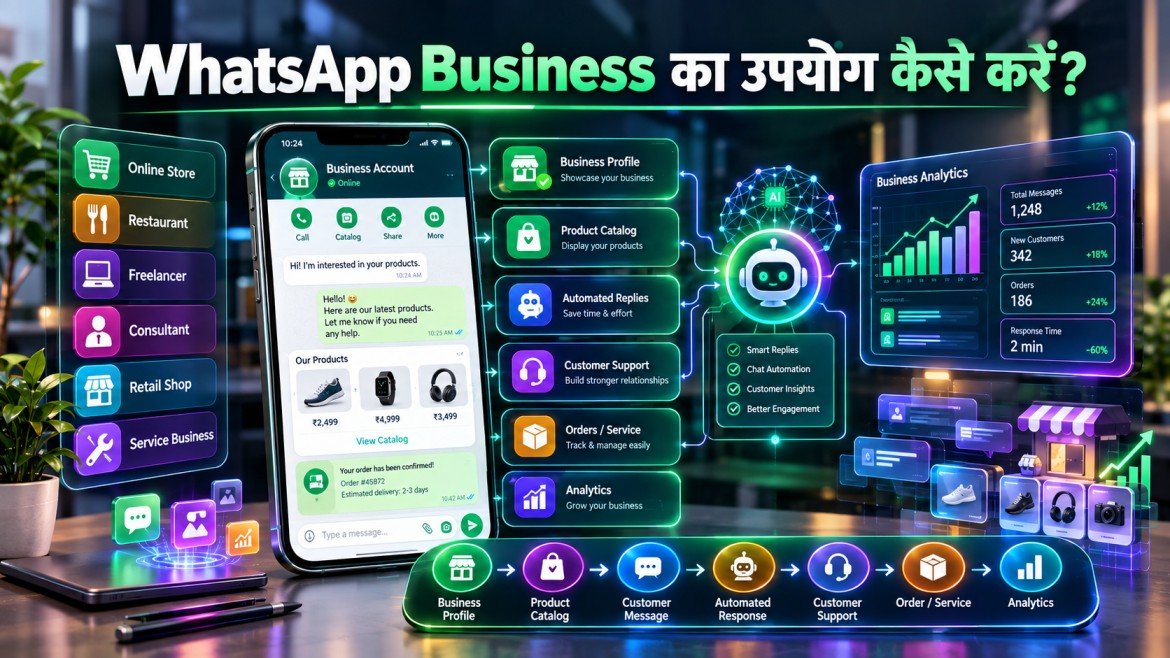
आज के digital युग में customers से सीधे और तेज़ communication करना किसी भी छोटे या बड़े business के लिए बेहद महत्वपूर्ण हो गया है। इसी जरूरत को पूरा करने के लिए WhatsApp Business एक लोकप्रिय business communication platform बन चुका है।
अगर आप छोटे business owner, freelancer, service provider, retailer, consultant, blogger या online seller हैं, तो WhatsApp Business के माध्यम से customers से बातचीत करने, products और services दिखाने, orders लेने और customer support देने की प्रक्रिया को व्यवस्थित किया जा सकता है।
साधारण WhatsApp की तुलना में WhatsApp Business में business profile, catalog, automated messages, labels और customer communication जैसे अतिरिक्त features मिलते हैं।
इसके साथ ही Artificial Intelligence और automation तेजी से business communication को बदल रहे हैं। इसलिए Future of AI को समझना भी उन businesses के लिए उपयोगी है जो आने वाले समय में WhatsApp जैसे platforms पर automation और intelligent customer support का उपयोग करना चाहते हैं।
इस article में हम जानेंगे कि WhatsApp Business का उपयोग कैसे करें, account कैसे बनाएं, profile कैसे सेट करें, catalog कैसे बनाएं, automated messages कैसे configure करें और business growth के लिए इसका प्रभावी उपयोग कैसे किया जा सकता है।
Table of Contents
WhatsApp Business क्या है?
WhatsApp Business एक business-oriented messaging application है जिसे businesses और professionals को customers के साथ communication व्यवस्थित करने में मदद करने के लिए बनाया गया है।
इसके माध्यम से business owner:
- Customer queries का जवाब दे सकता है।
- Business information दिखा सकता है।
- Products या services का catalog बना सकता है।
- Welcome messages भेज सकता है।
- Away messages configure कर सकता है।
- Customers को labels से organize कर सकता है।
- Orders और inquiries पर बातचीत कर सकता है।
- Customer support को अधिक structured बना सकता है।
उदाहरण के लिए, यदि आपका home-based bakery business है, तो आप WhatsApp Business पर cakes, pastries और customized products का catalog बना सकते हैं और customers को उसी platform पर जानकारी दे सकते हैं।
WhatsApp Business का उपयोग क्यों करें?
आज customers quick responses और convenient communication चाहते हैं। Email या traditional phone calls की तुलना में messaging-based communication कई businesses के लिए अधिक accessible हो सकता है।
WhatsApp Business का उपयोग करने के प्रमुख कारण हैं:
1. Customer Communication
Customers सीधे message करके product, price, availability या service के बारे में पूछ सकते हैं।
2. Business Profile
आप business name, description, category, address, website और अन्य relevant information जोड़ सकते हैं।
3. Product Catalog
Products और services को एक digital catalog में प्रदर्शित किया जा सकता है।
4. Automated Communication
कुछ सामान्य customer interactions के लिए automated greetings और away messages उपयोग किए जा सकते हैं।
5. Customer Organization
Labels की मदद से अलग-अलग customer conversations को organize किया जा सकता है।
6. Brand Accessibility
Customers को business से संपर्क करने का एक सरल communication channel मिलता है।
WhatsApp Business Account कैसे बनाएं?
WhatsApp Business शुरू करना अपेक्षाकृत आसान है।
Step 1: WhatsApp Business App डाउनलोड करें
अपने smartphone के official app store से WhatsApp Business application install करें।
Step 2: Mobile Number Verify करें
Business के लिए उपयोग किए जाने वाले phone number को verify करें।
यदि संभव हो तो personal और business communication के लिए अलग number रखना organization के लिहाज से उपयोगी हो सकता है।
Step 3: Business Name सेट करें
अपना business name सावधानी से दर्ज करें।
ऐसा नाम इस्तेमाल करें जिसे customers आपके brand के रूप में आसानी से पहचान सकें।
Step 4: Business Category चुनें
अपने business के लिए appropriate category चुनें।
उदाहरण:
- Retail
- Education
- Food
- Beauty
- Professional Services
- Technology
- Consulting
Step 5: Business Profile Complete करें
Profile में relevant information जोड़ें:
- Business description
- Business hours
- Location
- Website
- Category
एक complete profile customers के लिए अधिक useful होती है।
WhatsApp Business Profile को Professional कैसे बनाएं?
सिर्फ account बनाना पर्याप्त नहीं है। Profile को ऐसा बनाना चाहिए कि customer को business के बारे में basic information तुरंत मिल सके।
अच्छी Business Profile में क्या होना चाहिए?
- स्पष्ट business name
- Professional profile image
- छोटा और स्पष्ट description
- सही business category
- Updated working hours
- Website link
- Contact information
- महत्वपूर्ण products या services की जानकारी
उदाहरण के लिए:
Business Name: Digital Growth Studio
Category: Digital Marketing
Description: SEO, social media marketing और website growth services
Hours: Monday–Saturday, 10 AM–7 PM
इस तरह customer को conversation शुरू करने से पहले ही basic information मिल जाती है।
WhatsApp Business Catalog क्या है?
Catalog WhatsApp Business का महत्वपूर्ण feature है जो businesses को अपने products और services को digital format में दिखाने में मदद करता है।
Catalog में आप सामान्यतः जोड़ सकते हैं:
- Product name
- Product image
- Description
- Price
- Product code
- Website या अन्य relevant information
Catalog का Example
मान लीजिए आपकी एक clothing shop है।
आप catalog में जोड़ सकते हैं:
Product: Cotton Shirt
Price: ₹799
Description: Premium cotton casual shirt
Availability: Available
Customer को product information देखने के लिए अलग website खोलने की आवश्यकता कम हो सकती है।
WhatsApp Business में Automated Messages कैसे इस्तेमाल करें?
Business owners को हर समय online रहना संभव नहीं होता। ऐसे में automated messaging features उपयोगी हो सकते हैं।
Greeting Message
नए customer को स्वागत संदेश भेजा जा सकता है।
उदाहरण:
नमस्ते! हमारे business से संपर्क करने के लिए धन्यवाद। कृपया बताएं कि हम आपकी किस प्रकार सहायता कर सकते हैं?
Away Message
Business hours के बाहर आने वाले messages के लिए away message उपयोग किया जा सकता है।
उदाहरण:
धन्यवाद! हमारा business अभी बंद है। हम अपने working hours के दौरान आपके message का जवाब देंगे।
Quick Replies
बार-बार पूछे जाने वाले questions के लिए predefined replies उपयोगी हो सकते हैं।
उदाहरण:
Customer: आपका delivery time कितना है?
Quick Reply: सामान्यतः order dispatch होने के बाद delivery location के अनुसार निर्धारित समय में की जाती है।
इससे repetitive communication का समय कम हो सकता है।
WhatsApp Business Labels का उपयोग कैसे करें?
यदि आपके पास बड़ी संख्या में customer conversations हैं, तो उन्हें organize करना आवश्यक हो जाता है।
Labels इसमें मदद कर सकते हैं।
आप categories बना सकते हैं:
- New Customer
- New Order
- Payment Pending
- Order Completed
- Follow-up Required
- Important Customer
- Support Required
उदाहरण के लिए, जिन customers ने product के बारे में inquiry की है, उन्हें New Lead label दिया जा सकता है।
जब customer purchase करता है, conversation को Order Confirmed label में move किया जा सकता है।
WhatsApp Business से Customer Support कैसे करें?
WhatsApp Business customer support के लिए भी उपयोगी हो सकता है।
एक structured support process इस प्रकार हो सकता है:
Customer Message → Query Identification → Relevant Response → Issue Resolution → Follow-up
Customer support के लिए कुछ सामान्य categories बनाई जा सकती हैं:
Product Query
Product की price, availability और features से संबंधित questions।
Order Query
Order status, delivery और payment से संबंधित questions।
Technical Support
Service या product में technical problem होने पर assistance।
Feedback
Customer satisfaction और suggestions collect करने के लिए communication।
WhatsApp Business का उपयोग Marketing के लिए कैसे करें?
WhatsApp को केवल customer support platform के रूप में नहीं देखा जाना चाहिए। इसका उपयोग marketing communication में भी किया जा सकता है, लेकिन promotional messages भेजते समय customer consent, platform policies और applicable regulations का ध्यान रखना आवश्यक है।
Businesses इसका उपयोग कर सकते हैं:
- Product announcements
- Offers
- New launches
- Educational content
- Event reminders
- Order-related updates
- Customer follow-ups
Marketing का उद्देश्य केवल अधिक messages भेजना नहीं होना चाहिए। Relevant और valuable communication अधिक महत्वपूर्ण है।
WhatsApp Business और AI का संबंध
Artificial Intelligence धीरे-धीरे customer communication और business automation का हिस्सा बन रहा है।
यहीं से Future of AI और WhatsApp Business के बीच एक महत्वपूर्ण connection दिखाई देता है।
भविष्य में AI-powered systems customer questions को समझने, relevant information खोजने और response तैयार करने में मदद कर सकते हैं।
उदाहरण:
Customer: क्या यह product available है?
AI System: Product inventory information check करता है।
System: Available stock के आधार पर response तैयार करता है।
ऐसी technology का development Future of AI को business communication के लिए अधिक relevant बना रहा है।
WhatsApp Business और Future of AI
Future of AI का एक महत्वपूर्ण हिस्सा conversational automation हो सकता है।
AI systems केवल predefined replies देने के बजाय customer intent को समझने और context के आधार पर responses तैयार करने की दिशा में विकसित हो रहे हैं।
Future of AI में businesses के लिए intelligent virtual assistants अधिक महत्वपूर्ण हो सकते हैं।
ऐसे systems संभावित रूप से:
- Customer questions classify कर सकते हैं।
- Relevant information खोज सकते हैं।
- Frequently asked questions का जवाब दे सकते हैं।
- Human agents को complex queries transfer कर सकते हैं।
- Customer history के आधार पर context समझ सकते हैं।
- Communication analytics में सहायता कर सकते हैं।
इस perspective से Future of AI छोटे businesses के लिए भी महत्वपूर्ण हो सकता है।
WhatsApp Business Automation का Future
Automation का अगला चरण केवल message scheduling तक सीमित नहीं रहेगा।
Future of AI आधारित systems customer intent और conversation context को समझने में अधिक सक्षम हो सकते हैं।
कल्पना कीजिए कि customer पूछता है:
“मुझे ₹2,000 के अंदर birthday gift चाहिए जो अगले दो दिनों में deliver हो सके।”
एक advanced AI-enabled business system संभावित रूप से:
- Customer requirement समझ सकता है।
- Product catalog search कर सकता है।
- Price filter कर सकता है।
- Delivery availability check कर सकता है।
- Relevant products suggest कर सकता है।
- Human agent को conversation transfer कर सकता है।
ऐसी capabilities Future of AI को traditional chatbot से आगे ले जा सकती हैं।
WhatsApp Business के फायदे
कम Communication Cost
Messaging-based communication कई traditional communication methods की तुलना में convenient हो सकता है।
तेज Customer Response
Businesses common queries के लिए quick replies और automation का उपयोग कर सकते हैं।
बेहतर Organization
Labels और catalogs customer interactions को व्यवस्थित करने में मदद करते हैं।
आसान Product Discovery
Catalog customers को products या services देखने का convenient तरीका देता है।
Relationship Building
Regular, relevant और permission-based communication customer relationships को मजबूत करने में योगदान दे सकती है।
WhatsApp Business की चुनौतियां
हर technology की तरह WhatsApp Business के साथ भी कुछ challenges जुड़े हैं।
1. बहुत अधिक Messages
यदि business हर customer को लगातार promotional messages भेजता है, तो users परेशान हो सकते हैं।
2. Privacy
Customer information को responsibly handle करना आवश्यक है।
3. Automation पर अत्यधिक निर्भरता
हर समस्या automated response से solve नहीं की जा सकती।
Complex customer issues के लिए human support आवश्यक हो सकता है।
4. गलत Information
यदि automated system में गलत product price या outdated information है, तो customer experience प्रभावित हो सकता है।
5. AI की सीमाएं
Future of AI की capabilities बढ़ने के बावजूद AI-generated responses की human review कई business scenarios में महत्वपूर्ण रहेगी।
WhatsApp Business और Digital Transformation
आज digital transformation केवल websites और online payments तक सीमित नहीं है।
Businesses customer communication, sales, marketing, analytics और support को भी digital workflows में integrate कर रहे हैं।
WhatsApp Business इस transformation का एक practical communication layer बन सकता है।
एक modern business ecosystem कुछ इस प्रकार हो सकता है:
Website → CRM → WhatsApp Business → Payment System → Customer Support → Analytics
AI integration के साथ यह workflow और sophisticated हो सकता है।
Future of AI इस digital transformation को अधिक intelligent और automated बनाने में भूमिका निभा सकता है।
WhatsApp Business से Business Growth के Opportunities
WhatsApp Business छोटे businesses के लिए कई opportunities create कर सकता है।
Local Businesses
Restaurants, salons, repair services और retailers customers से direct communication कर सकते हैं।
Freelancers
Freelancers inquiries, quotations और project communication manage कर सकते हैं।
Online Sellers
Product catalog और customer communication को एक platform पर organize किया जा सकता है।
Consultants
Consultants appointments, FAQs और client communication manage कर सकते हैं।
Educational Businesses
Coaching centers और educators course information और student communication के लिए messaging workflows बना सकते हैं।
Future of AI के साथ ये use cases आगे और intelligent हो सकते हैं।
WhatsApp Business के लिए Best Practices
अगर आप WhatsApp Business को professional तरीके से इस्तेमाल करना चाहते हैं, तो इन practices को अपनाएं:
- Profile information हमेशा updated रखें।
- Business hours स्पष्ट रखें।
- Customer queries का समय पर जवाब दें।
- Catalog को regularly update करें।
- पुराने product prices हटाएं।
- Quick replies का उपयोग करें।
- Customers को unnecessary promotional messages न भेजें।
- Customer consent और privacy का सम्मान करें।
- Sensitive information को सुरक्षित रखें।
- Complex problems के लिए human support उपलब्ध रखें।
- Analytics और customer feedback का उपयोग करें।
- Automation को business strategy के साथ integrate करें।
Future of AI आधारित tools का उपयोग करते समय भी human oversight बनाए रखना महत्वपूर्ण रहेगा।
WhatsApp Business के लिए AI का उपयोग कैसे बढ़ सकता है?
आने वाले वर्षों में Future of AI customer communication को कई स्तरों पर प्रभावित कर सकता है।
Intelligent Chatbots
AI-powered assistants सामान्य questions का conversational तरीके से जवाब दे सकते हैं।
AI-Based Recommendations
Customer की requirements के आधार पर relevant products खोजने में AI सहायता कर सकता है।
Conversation Summaries
लंबी customer conversations का summary support agents के लिए तैयार किया जा सकता है।
Sentiment Analysis
AI customer messages में positive, negative या frustrated communication patterns identify करने में सहायता कर सकता है।
Predictive Customer Support
कुछ systems customer behavior और previous interactions के आधार पर संभावित support needs identify करने की दिशा में विकसित हो सकते हैं।
यही कारण है कि Future of AI को समझना modern digital businesses के लिए increasingly relevant है।
Future Trends: WhatsApp Business में क्या बदलाव आ सकते हैं?
Technology तेजी से बदल रही है और Future of AI WhatsApp-based business communication को प्रभावित करने वाले प्रमुख trends में शामिल हो सकता है।
AI-Powered Customer Service
Businesses increasingly intelligent assistants का उपयोग कर सकते हैं।
Conversational Commerce
Customer discovery से लेकर product selection और purchase support तक communication-based commerce बढ़ सकता है।
Personalized Communication
Customer preferences और interaction history के आधार पर अधिक relevant communication विकसित हो सकती है।
Automated Lead Qualification
AI systems संभावित customers की queries को analyze करके sales teams को qualified leads identify करने में मदद कर सकते हैं।
Omnichannel Integration
WhatsApp को CRM, websites, email, social media और other business platforms के साथ connect करने की demand बढ़ सकती है।
इन सभी developments में Future of AI एक महत्वपूर्ण technology trend बना रह सकता है।
WhatsApp Business का Impact छोटे Businesses पर
WhatsApp Business ने छोटे businesses के लिए customer communication को अधिक accessible बनाया है।
पहले कई small businesses को customer support के लिए अलग systems की आवश्यकता होती थी। अब messaging-based communication के माध्यम से basic customer interactions manage करना आसान हो सकता है।
Future of AI इस accessibility को और बढ़ा सकता है क्योंकि intelligent automation छोटे businesses को limited resources के साथ अधिक efficient workflows बनाने में मदद कर सकता है।
हालांकि technology का impact business strategy, customer expectations, data quality और implementation quality पर निर्भर करेगा।
WhatsApp Business इस्तेमाल करते समय किन गलतियों से बचें?
केवल Promotional Messages भेजना
हर conversation को sales pitch में बदलने से customer trust प्रभावित हो सकता है।
Profile Update न करना
पुरानी information customers को confuse कर सकती है।
Customer Questions Ignore करना
Late responses conversion और customer satisfaction दोनों को प्रभावित कर सकते हैं।
Automation को Human Support का Replacement समझना
Complex queries के लिए trained human support आवश्यक हो सकता है।
बिना Review के AI Responses भेजना
Future of AI technology powerful हो सकती है, लेकिन AI-generated responses को business context और accuracy के लिए review करना आवश्यक है।
WhatsApp Business से जुड़ी Long-Term Opportunity
WhatsApp Business केवल messaging application के रूप में सीमित नहीं रह सकता। Business communication के broader digital ecosystem में messaging, commerce, customer support, payments, CRM और AI-assisted workflows increasingly interconnected हो सकते हैं।
Future of AI इस ecosystem में automation और personalization के नए opportunities create कर सकता है।
छोटे business owners के लिए सबसे महत्वपूर्ण बात यह है कि technology को अपनाने से पहले अपने customer journey को समझें।
पहले यह तय करें:
- Customer कौन है?
- Customer की मुख्य problem क्या है?
- कौन से questions बार-बार आते हैं?
- कौन सी communication repetitive है?
- कौन सा काम automate किया जा सकता है?
- किन मामलों में human support जरूरी है?
इसके बाद WhatsApp Business और AI tools को workflow में शामिल करना अधिक प्रभावी हो सकता है।
निष्कर्ष
अगर आप सोच रहे हैं कि WhatsApp Business का उपयोग कैसे करें, तो शुरुआत एक professional business profile, clear catalog, organized customer labels और useful automated messages से करें।
WhatsApp Business छोटे businesses, freelancers, retailers, consultants और service providers के लिए customer communication को अधिक structured बनाने का practical माध्यम हो सकता है।
आने वाले समय में Future of AI WhatsApp-based communication को और intelligent बनाने में महत्वपूर्ण भूमिका निभा सकता है। AI-powered customer support, personalized recommendations, automated lead qualification और conversational commerce जैसे applications business workflows को बदल सकते हैं।
हालांकि Future of AI को अपनाते समय privacy, security, accuracy और human oversight को नजरअंदाज नहीं करना चाहिए।
Digital transformation का वास्तविक impact केवल automation से नहीं बल्कि सही technology को सही business problem के साथ जोड़ने से आता है।
इसलिए WhatsApp Business को केवल messages भेजने के platform के रूप में न देखें। इसे customer communication, support, sales और long-term relationship management के broader digital strategy का हिस्सा बनाया जा सकता है।
Frequently Asked Questions
WhatsApp Business किसके लिए उपयोगी है?
यह छोटे businesses, retailers, freelancers, consultants, service providers, creators और अन्य professionals के लिए उपयोगी हो सकता है।
क्या WhatsApp Business Free है?
WhatsApp Business application के कुछ features बिना subscription के उपलब्ध होते हैं, जबकि कुछ business solutions और advanced services की अलग terms, availability या costs हो सकती हैं।
WhatsApp Business में Catalog क्या है?
Catalog एक digital product/service showcase है जिसमें business अपने products या services की information customers के साथ share कर सकता है।
क्या WhatsApp Business में automatic replies भेज सकते हैं?
हाँ, उपलब्ध business features के माध्यम से greeting messages, away messages और quick replies जैसी सुविधाओं का उपयोग किया जा सकता है।
क्या WhatsApp Business को AI के साथ इस्तेमाल किया जा सकता है?
हाँ, APIs, third-party systems और AI-enabled business solutions के माध्यम से advanced automation संभव हो सकती है। हालांकि exact capabilities implementation और available platform features पर निर्भर करती हैं।
Future of AI WhatsApp Business को कैसे प्रभावित कर सकता है?
Future of AI intelligent customer support, automated responses, personalized recommendations, conversation analysis और business workflow automation को प्रभावित कर सकता है।